
What's new in Radi v0.9.4
2012.11.25
The keyframe button in the Inspector now displays a menu when clicked. Previously it would toggle the keyframe on/off when clicked (i.e. add a new keyframe or delete the existing one). The menu was previously shown when the button was right-clicked or Cmd-clicked, but this made it difficult to discover the menu, so the menu is now the default action.
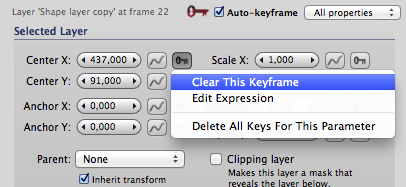
Toggling the keyframe is now the first command in the menu. As a shortcut that works like the old behavior, you can also Shift-click the button. (Another shortcut available is to Alt-click the button to perform the "Delete All Keys" command.)
Added support for the "Screen" blending mode for layers contained in a Canvas element.
Of the blending modes available in Radi, the HTML5 Canvas element can support only Normal and Screen blending. There is now a warning triangle displayed in the Inspector when an incompatible blending mode is selected for a layer that's within a Canvas.
Shapes with a patterns fill are now displayed with a multicolor icon in the Shape layer's Inspector view list.
Frame numbers are shown above the timeline. (I know, this should have been added ages ago...)
The Assets menu has been renamed as the Document menu, and it now contains some document-related commands that previously were only available as buttons below the Timeline.
Assets can now be drag-and-dropped from the Asset Library into the document view.
Using assets in this way makes it easy to create several picture layers that refer to a single source image. When you reload the picture asset's contents, all the referring layers will be updated.
To create new assets, you can now drag'n'drop files from the Finder into the Asset Library.
The Asset Library and Text Block Editor windows are now accessible as buttons in the toolbar.
Reduced size of published HTML files when using shape poses, particularly in situations where the same frame has been copied several times onto the timeline.
Fixed bug where text layer would be incorrectly positioned when part of the layer was outside the canvas area.
Fixed bug in compositing order of block elements within published HTML files.
Fixed bugs and UI annoyances in the Inspector view for a Shape layer.
Did you miss a release? Find out what happened previously:
What's new in Radi 0.9.3
Copyright 2012 Lacquer oy/ltd. All rights reserved.